JPL
Testing out querying Prolog from Bioclipse
Sun, 2009-11-01 00:20 | by Samuel Lampa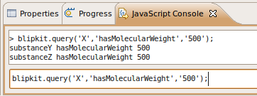
My project has been more or less on hold for around a week because of exams and other stuff. Looking forward to getting some concrete things done now. While still reading up a bit on OWL, I've started taken the first steps of the prolog/blipkit integration with a simple method for querying a prolog on the form "subject, a predicate, and an object".
Accessing BLIPKIT from command line Java or Eclipse Plug-in in Ubuntu
Fri, 2009-10-16 20:28 | by Samuel LampaFor my own documentation I went ahead and summarized all the steps I had to take
- In order to start blipkit from java commandline, and
- In order to start blipkit from an Eclipse plugin.
Finally got blipkit started from java via jpl
Fri, 2009-10-16 11:17 | by Samuel LampaFinally got blipkit started from java via jpl :)
- (Thanks to Andrew Koster on the SWIPL mailing list, who made me continue researching the LD_PRELOAD trick!)
In order to get the jpl java examples to work, LD_LIBRARY_PATH has to contain:
/usr/lib/jvm/java-1.5.0-sun-1.5.0.19/jre/lib/i386/client/:/usr/lib/jvm/java-1.5.0-sun-1.5.0.19/jre/lib/i386/
Furthermore, CLASSPATH has to be:
/usr/local/lib/pl-5.7.15/lib/jpl.jar:/home/samuel/install/swi-prolog/pl57/packages/jpl/examples/java/Test
Now firing up blipkit works, when calling Java from commandline!!!
[SOLVED] How to set java.library.path for an Eclipse/Bioclipse plugin?
Tue, 2009-10-13 16:38 | by Samuel LampaEDIT: Se solution at the bottom of the page
I'm trying to set the java.library.path system setting for my Bioclipse manager/Eclipse plugin.
Normally, if running java from command line, this variable should be set like so (According to what I've googled up):
java -Djava.library.path=/usr/local/lib/pl-5.7.15/lib/i686-linux/JavaClassName
so I have tried to add the line
-Djava.library.path="/usr/local/lib/pl-5.7.15/lib/i686-linux/"
to the arguments in "Run" > "Run configurations" for my plugin's product file, under the "arguments" tab.
Java/Prolog interface (SWI Prolog JPL) up running!
Tue, 2009-10-06 21:49 | by Samuel LampaInstall notes for SWI Prolog JPL on Ubuntu Jaunty (9.04)
JPL is a bi-directional Java/Prolog interface for SWI-Prolog, which I hope to be able to use for integrating Blipkit into Bioclipse, so I'm happy to have got it up running tonight. Below are some notes from the installation procedure.
NOTE: These are still rather incomplete notes about how to get this to work.
Recent blog posts
- I created a Udemy course on my favourite linux commandline productivity techniques
- My top-languages-per-use-case list
- The smallest pipeable python script
- Vote for ProcessWire to be packaged as a BitNami image
- Calling Java from Python without the JVM startup latency: NailGun and JPype
- New Google+ communities: Bioclipse, Cheminformatics, Semantic MediaWiki
- Don't use Swedish keyboard with vim/screen/bash
- Easier debugging of Go programs on the command line with CGDB
- Profiling and creating call graphs for Go programs with "go tool pprof"
- Python-like generator functions in Go

